 Lekker Sun
Chapter 8 of 12
Costing the project: the bill of materials
The bill of materials turns the design into a price. The equipment comes straight from the design; you add everything else it takes to install it. Its total is the system cost used for payback and on the client proposal.
All chapters
The bill of materials
The bill of materials is at the top of the Equipment tab. It fills in as you work:
- Panels: the quantity follows the panels you've drawn. Remove a panel on the roof and the count drops.
- Inverter: the quantity is the number of inverters in parallel (1 or 2).
- Battery: the quantity sets the battery bank (batteries in series × strings in parallel), so the compatibility checks follow it.
Type the price each straight into the table. ✎ opens the equipment's full details.
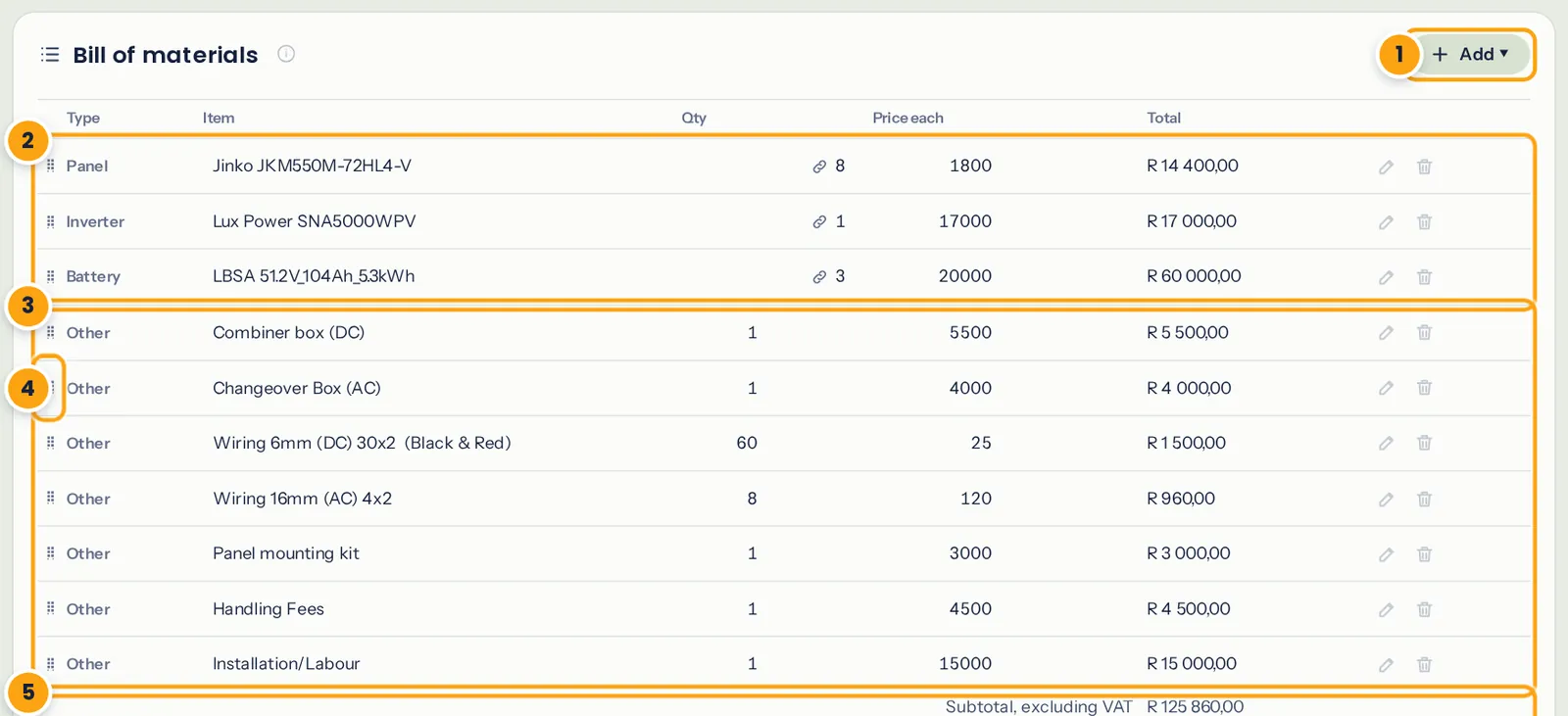
- Add: equipment, your own lines or a heading.
- Equipment, with the quantities the design and the checks set.
- Your own lines: protection, cabling, mounting and labour.
- Drag ⠿ to change the order.
- Subtotal, VAT and total.
Add installation, wiring and other lines
Open Add → Other line for everything that isn't a panel, inverter or battery, and type the item, quantity and price each. A typical residential installation needs lines for:
- DC side: combiner box or isolators, DC fuses and surge protection
- AC side: changeover box or essential loads board, breakers, AC surge protection
- Cabling: DC solar cable (often priced per metre, red and black), AC cable, battery cables and lugs
- Mounting: rails, roof hooks or tile brackets, clamps, or a tilt-frame kit
- Earthing and bonding
- Labour, travel, the electrical certificate (CoC) and municipal registration where it applies
Our example adds a DC combiner box, an AC changeover box, 60 m of 6 mm² DC cable, AC cable, a mounting kit, handling fees and installation labour. The 🗑 on a line deletes it.
Tip: the wiring diagram in chapter 9 is a good checklist for the protection and cabling lines. Every box on it is something you need to buy.
Group lines under headings
Add → Heading adds a section heading such as "Protection", "Mounting" or "Labour". Lines below a heading are grouped under it on the report and the proposal. Drag ⠿ on any row to move it, including the equipment rows.
VAT
Prices in the bill of materials are entered without VAT. Where your plan includes VAT (see the pricing page), tick VAT in the totals at the bottom of the table and set the rate (15% in South Africa). The table then shows the subtotal, the VAT and the total including VAT, and that total is the system cost used on the Finance tab and the proposal.
When you're happy with the price, open the Finance tab: the savings update by themselves, so the payback uses it.