 Lekker Sun
Chapter 6 of 12
Checking strings, inverter and battery compatibility
The compatibility checks catch the mistakes that damage equipment or quietly lose energy: a string that's too long for a frosty morning, too short for a hot afternoon, or a battery the inverter can't charge properly. They run on the Equipment tab every time you change something.
All chapters
Where to find the checks
Open the Equipment tab: System compatibility is at the top. It's laid out the way the system is wired: solar panels on the left, the inverter in the middle and the battery bank on the right, with the checks for each part underneath it. The bar at the top counts how many checks pass; checks that pass fold into one line, and warnings stay open.
On the Design tab, a badge at the top of the map shows the same result. Click it to jump to the checks.
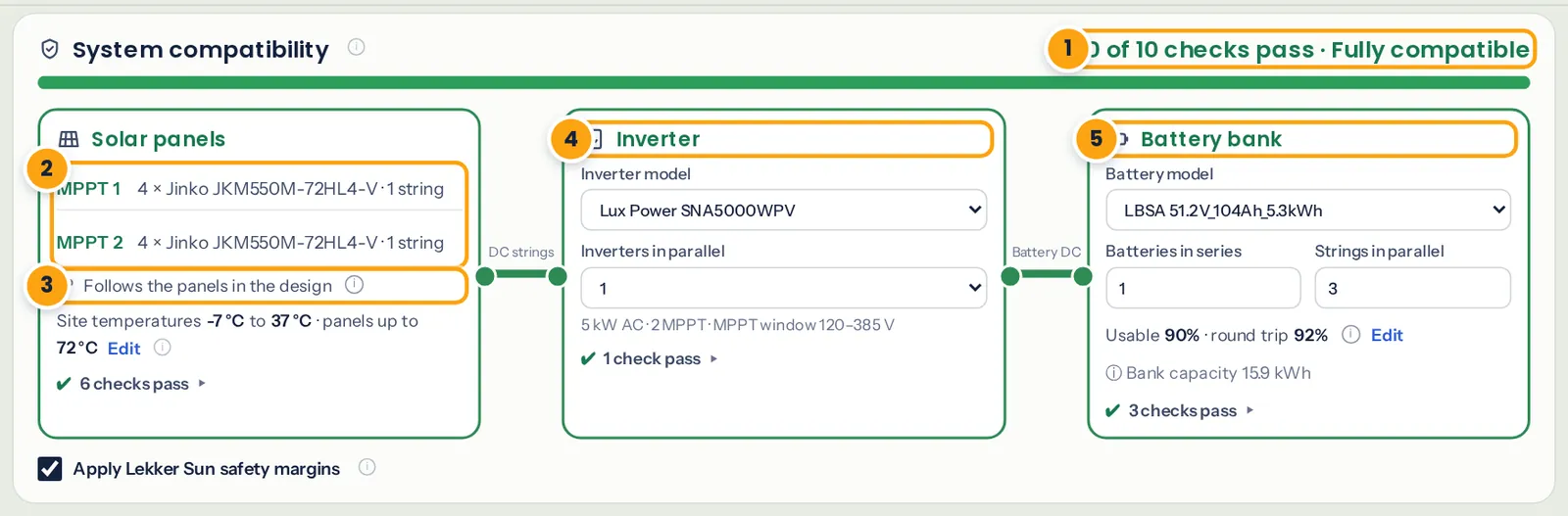
- How many checks pass.
- The panels and strings on each MPPT input, following the arrays you drew.
- Temperatures used for the voltage checks.
- The inverter, and whether there are one or two in parallel.
- The battery model, and how many in series and in parallel.
Set the temperatures
Panel voltage rises in the cold and falls in the heat, so the checks need the site's extremes:
- Coldest air: the coldest morning you expect. String voltage is highest at sunrise on that morning.
- Hottest air: the hottest afternoon.
- Hottest panel: leave it blank and Lekker Sun adds the sun's heat for the mounting: +35 °C flush on a roof, +30 °C on a tilt frame, +25 °C on an open rack.
Click Edit on the Site temperatures line to change them. Lekker Sun suggests the site's own values from its weather, with a margin. Click Use these to fill them in. On the Highveld, frost is common, so check the coldest value: our example uses −7 °C.
The string checks
For every MPPT input:
- Cold Voc vs the inverter's maximum DC voltage. The most important one. Over the limit, the inverter can be damaged on a cold, bright morning.
- Hot Vmp vs the MPPT minimum. On a hot afternoon the string voltage drops. Below the window, the inverter can't track the panels and you lose energy.
- Cold Vmp vs the MPPT maximum. Above the window, the inverter limits the panels.
- MPPT current and short-circuit current vs what the input can take.
- MPPTs used vs how many the inverter has.
The background is in the guide to checking string voltage for cold weather.
Inverter and battery checks
- PV array vs the inverter's maximum PV power, with the DC/AC ratio. A ratio above 1 is normal and often sensible; see DC/AC ratio and inverter clipping.
- Battery bank voltage (min to max) vs the inverter's battery range.
- Charge and discharge current of the bank vs the inverter's battery port.
- Bank capacity, for information.
Choose the battery's Batteries in series and Strings in parallel here. For 48 V systems, batteries are usually all in parallel: our example is 1 in series × 3 in parallel, 15.9 kWh.
Safety margins and amber results
With Apply Lekker Sun safety margins ticked, a check that passes but is close to its limit shows amber instead of green: voltages within 3% of a limit, hot Vmp less than 10% above the MPPT minimum, current within 5%, short-circuit current × 1.25 above the inverter's maximum, or the battery within 2% of its range. Amber isn't a failure. It's a prompt to double-check the datasheet and the temperatures.
Fixing what the checks flag
Each warning says what to change underneath it. The usual fixes:
- Cold Voc too high: fewer panels in the string. Remove panels from the array, or split it into two arrays on different inputs.
- Hot Vmp too low: more panels in series, or join two arrays on the same input into one series string.
- Current too high: fewer strings in parallel on that input; move an array to the other MPPT.
- Battery current: add a battery in parallel to share the current, or check the inverter's battery limits.
Strings follow the arrays you drew, so most fixes happen on the Design tab. The checks update as soon as you let go.
The same checks, with the strings table, are printed in the report's compatibility section.